Building a Serverless PDF Data Extraction Pipeline on AWS
I recently open-sourced a project I built while working at AutoShopIQ: a serverless pipeline that automatically extracts structured data from PDFs using Amazon Textract. In this post, I'll walk through why I built it, how it works, the architecture decisions I made, and the real pitfalls that most AWS tutorials skip over.
GitHub: aws-pdf-textract-pipeline
The Problem
At AutoShopIQ, we receive hundreds of automotive repair order PDFs every month. Each one contains structured data — shop information, customer details, vehicle info, line-item repairs, parts, labor costs — buried inside a PDF that no database can query directly.
The goal: automatically extract that structured data every time a PDF lands in our system, without any manual intervention and without managing servers.
What the Pipeline Does
The flow is straightforward:
- A PDF is uploaded to an S3 bucket
- S3 automatically triggers a Lambda function
- Lambda sends the PDF to Amazon Textract for OCR analysis
- Textract extracts text, form fields (key-value pairs), and tables
- Lambda normalizes the raw output into clean, structured JSON
- Both raw and normalized JSON are saved back to S3
No servers to manage. No infrastructure to maintain. Pay only for what you process.
The entire pipeline runs in about 30 seconds for a typical 2-page document.
AWS Services Used
| Service | Role | Free Tier |
|---|---|---|
| Amazon S3 | Stores PDFs and JSON output | 5 GB storage, 20K GET, 2K PUT/month |
| AWS Lambda | Runs extraction and normalization code | 1M requests, 400K GB-seconds/month |
| Amazon Textract | OCR — extracts text, forms, tables | 1,000 pages/month (first 3 months) |
| CloudWatch | Logs and monitoring | 5 GB log ingestion/month |
| IAM | Security and permissions | Always free |
Estimated cost for small-scale use (100 documents/month, ~2 pages each): under $3/month after free tier.
Architecture
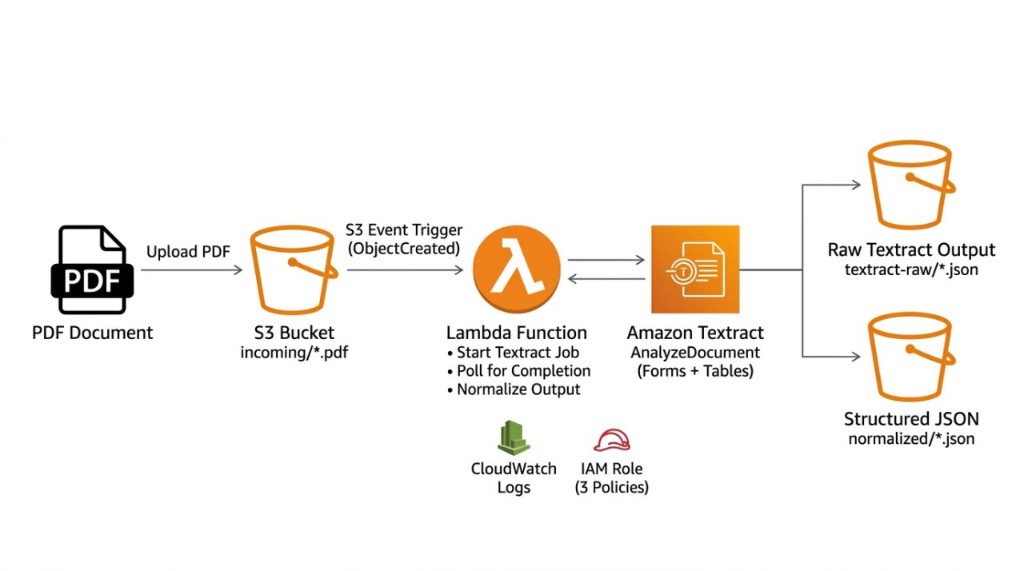
The bucket has three folders:
your-bucket/
├── incoming/      ← PDFs go here
├── textract-raw/  ← Raw Textract output
└── normalized/    ← Clean structured JSON
A Key Architecture Decision: One Lambda, Not Two
Many AWS tutorials use a two-Lambda pattern with SNS in between:
Lambda A → Textract → SNS notification → Lambda B
I simplified this to a single Lambda that handles everything:
Lambda → Textract (start + poll + collect) → save output
Why? For 1–5 page documents, Textract completes well within Lambda's 15-minute maximum timeout. The single-Lambda approach eliminates SNS, a second function, and the extra IAM role that allows Textract to publish to SNS. Fewer moving parts means fewer things to debug.
Why Async Textract?
Textract has two modes:
- Synchronous (
AnalyzeDocument): Returns results immediately, but only works for single-page documents - Asynchronous (
StartDocumentAnalysis): Works for multi-page PDFs, returns a job ID, requires polling
This pipeline uses async mode so it works with any PDF regardless of page count. The Lambda polls GetDocumentAnalysis every 5 seconds until Textract reports SUCCEEDED.
Understanding the Output
Raw Textract Output
The raw output contains hundreds of "blocks" — every element Textract detected:
| Block Type | What It Represents |
|---|---|
PAGE | A page in the document |
LINE | A line of text |
WORD | An individual word |
KEY_VALUE_SET | A form field (label → value pair) |
TABLE | A detected table |
CELL | A cell within a table |
SELECTION_ELEMENT | A checkbox |
Normalized Output
The Lambda parses those raw blocks and produces clean JSON ready for your application or database:
{
  "metadata": {
    "source_file": "incoming/invoice.pdf",
    "page_count": 2,
    "total_blocks": 342
  },
  "form_fields": {
    "Invoice Number": "INV-2026-0042",
    "Date": "January 15, 2026",
    "Total": "$4,627.19"
  },
  "tables": [
    {
      "title": "Line Items",
      "headers": ["Description", "Qty", "Unit Price", "Amount"],
      "rows": [
        {
          "Description": "Web Development",
          "Qty": "40",
          "Unit Price": "$75.00",
          "Amount": "$3,000.00"
        }
      ]
    }
  ],
  "text": {
    "full_text": ["All lines concatenated across pages"]
  },
  "summary": {
    "total_form_fields": 15,
    "total_tables": 1,
    "total_lines": 35
  }
}
The Pitfalls No Tutorial Mentions
These are the real issues I ran into. Each one will silently break your pipeline.
1. No prefix/suffix filter on the S3 trigger → infinite loop
If you set the S3 trigger to fire on any file upload, the Lambda triggers on the JSON files it writes — which triggers it again — forever. Always add an incoming/ prefix filter and a .pdf suffix filter.
2. Special characters in filenames → NoSuchKey errors
When S3 sends event notifications to Lambda, the filename is URL-encoded:
RO #53615.pdf → RO+%2353615.pdf
Without urllib.parse.unquote_plus(), the Lambda tries to read a file with the encoded name, which doesn't exist. This one line fixes failures for any filename with spaces, #, or other special characters — something I hit immediately with real-world repair order filenames.
3. Lambda timeout too short
The default Lambda timeout is 3 seconds. Textract takes 10–30 seconds for a 2-page PDF. Set the timeout to at least 3 minutes.
4. Missing S3 permissions on the Lambda role
Most tutorials only mention Textract permissions. If you attach AmazonTextractFullAccess but forget AmazonS3FullAccess, the Lambda runs Textract successfully — then fails silently when trying to save the results. You get no error in the function itself, only a confusing empty output folder.
5. Services in different regions
S3, Lambda, and Textract must all be in the same AWS region. Cross-region calls either fail or incur data transfer costs. Pick one region and stay consistent.
6. No CloudWatch logging permission
Without AWSLambdaBasicExecutionRole, errors happen but you can't see them. This should always be the first policy you attach.
Setting It Up Yourself
The repo includes a complete step-by-step setup guide in the README — no CLI required, everything through the AWS Console:
- Create an S3 bucket with three folders
- Create an IAM role with the three required policies
- Create the Lambda function and attach the role
- Set timeout (3 min), memory (256 MB), and environment variables
- Paste
lambda_function.pyinto the Lambda code editor - Add the S3 trigger with prefix/suffix filters
- Upload a PDF to
incoming/and watch JSON appear innormalized/
What I Learned
Building this forced me to think carefully about where normalization logic lives. Textract gives you raw blocks — it's your code's job to understand document structure. For automotive repair orders, that meant writing custom parsers for form field patterns, table layouts, and even inline notes embedded in job titles.
The pipeline in this repo is a clean, general-purpose version. The production version at AutoShopIQ has domain-specific normalization logic on top — recognizing repair order numbers, job codes, labor rates, and part numbers specific to TekMetric's PDF format.
If you're building anything that needs to process PDFs at scale on AWS, this architecture is a solid starting point.
GitHub: aws-pdf-textract-pipeline — MIT licensed, free to use and adapt.
Have questions about the pipeline or want to discuss document AI? Reach out at Abir.h.shah@gmail.com or connect on LinkedIn.